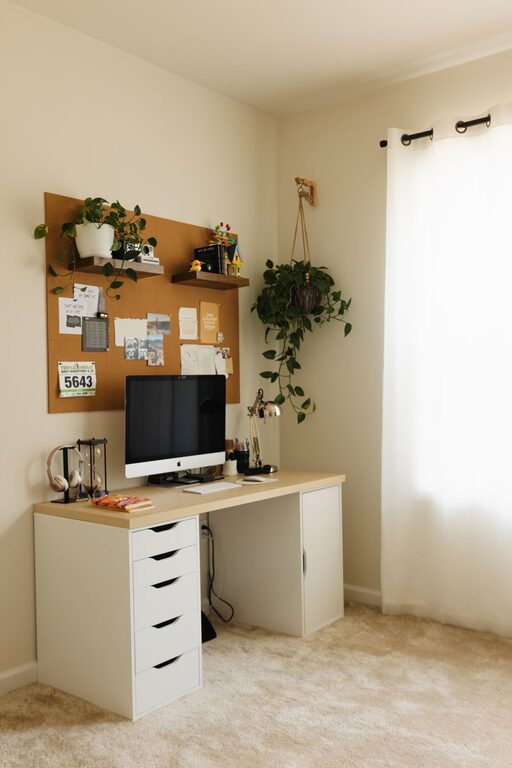
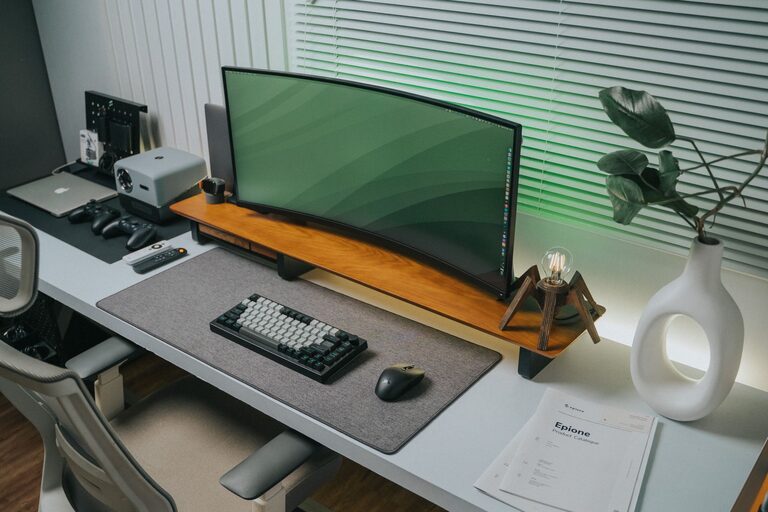
Creating a workspace that is clean, organized, and free of clutter can significantly improve both productivity and creativity. When your environment is tidy, your mind can focus better, leading to more efficient work and innovative ideas. Whether you work from home or in an office, organizing your workspace is essential for maintaining a clear mindset. In this post, we’ll explore practical tips and simple strategies to help you design a clutter-free workspace that supports your best work.
Why a Clutter-Free Workspace Matters
A cluttered space often translates into a cluttered mind. When your desk is piled with papers, gadgets, and miscellaneous items, it’s easy to feel overwhelmed or distracted. This mental clutter can slow down your decision-making, interrupt your focus, and lower your motivation. Conversely, a clean and organized environment promotes calmness and clarity, making it easier to think creatively and complete tasks efficiently.
Assess Your Current Workspace
Before you begin organizing, take a moment to evaluate your current setup:
– What items do you use regularly?
– Which things are rarely touched or unnecessary?
– Are there any distractions or obstacles to your workflow?
Knowing what you actually need and use everyday is the first step toward a streamlined workspace.
Declutter: Start With What You Don’t Need
Decluttering is about removing unnecessary items that do not serve your work routine. Here’s how to approach it:
- **Clear Your Desk Completely**
Take everything off your desk and place it in a temporary sorting area.
- **Sort Items Into Categories**
Create piles or boxes for items to keep, store, relocate, or discard.
- **Be Honest With Yourself**
If you haven’t used an item in the past month or it doesn’t affect your productivity, consider getting rid of it.
- **Digitize Paperwork**
Scan important documents instead of keeping stacks of paper. This reduces physical clutter and makes files easier to find.
Organize Your Desk for Functionality
Once you’ve decluttered, it’s time to organize the items you want to keep.
Keep Essential Items Within Reach
Only keep tools, supplies, and gadgets you regularly use on your desk. Store less frequently used items in drawers or shelves nearby. Common essentials might include:
– Your computer or laptop
– Notepad and a few pens
– Phone and charger
– A calendar or planner
Use Organizers and Containers
Desk organizers help keep small items like paper clips, sticky notes, and pens neatly arranged. Choose simple containers or drawer dividers to separate supplies.
Manage Cables
Tangled cables can create visual clutter and frustration. Use cable clips, ties, or sleeves to keep wires organized and out of the way.
Create Zones in Your Workspace
Design your workspace with different zones for various activities:
– Work Zone: Your main desk area with your computer and core tools.
– Reference Zone: A spot for books, manuals, or documents you frequently consult.
– Inspiration Zone: A small space for creative materials, mood boards, or personal items that motivate you.
– Storage Zone: Closets, drawers, or shelves for filing and storing supplies.
Having dedicated zones minimizes the clutter and makes it easier to find what you need.
Maintain Your Clean Workspace Daily
The key to a clutter-free workspace is regular maintenance:
– Spend 5–10 minutes at the end of each day tidying up.
– Put away items you used during the day.
– Throw away trash or unnecessary paper.
– Reassess your setup weekly to adjust as needed.
Regular upkeep prevents clutter from building up and keeps your workspace inviting.
Personalize Your Space Mindfully
While it’s important to minimize clutter, adding personal touches can boost creativity and comfort. Consider:
– A small plant or two for a touch of greenery
– Inspirational quotes or artwork on the wall
– A clean photo frame or meaningful object
Just be sure these items don’t overcrowd your desk or distract you from your work.
Use Digital Tools to Reduce Physical Clutter
Many tasks that used to require paperwork can now be handled digitally:
– Keep your calendar online instead of a physical planner.
– Use task management apps to organize your projects.
– Store files in the cloud to reduce paper.
Going digital reduces physical clutter and can make your work more efficient.
Lighting and Ergonomics Matter Too
A clutter-free workspace also includes comfortable conditions:
– Ensure proper lighting to reduce eye strain and increase alertness.
– Choose an ergonomic chair and desk setup to support good posture.
– Keep your monitor at eye level to avoid neck tension.
When you feel comfortable and focused, productivity and creativity will naturally improve.
Final Thoughts
Organizing a clutter-free workspace is a process that pays off with better focus, less stress, and more creativity. By decluttering, organizing efficiently, and maintaining your space daily, you create an environment that supports your best work. Remember, your workspace should work for you — make it simple, functional, and inspiring. Start small and enjoy the positive impact on your productivity and creativity!